We’re excited to present to you a simple yet powerful functionality that makes affiliate onboarding faster, easier and more autonomous for your team: Unique Affiliate Registration Links per Admin User.
If you manage an affiliate program with multiple team members, you know how time-consuming it can be to manually assign every new affiliate to the right person. This feature eliminates that bottleneck entirely, giving each of your Admin Users their own personal registration link that automatically routes affiliates to the right place.
What Are Unique Registration Links?
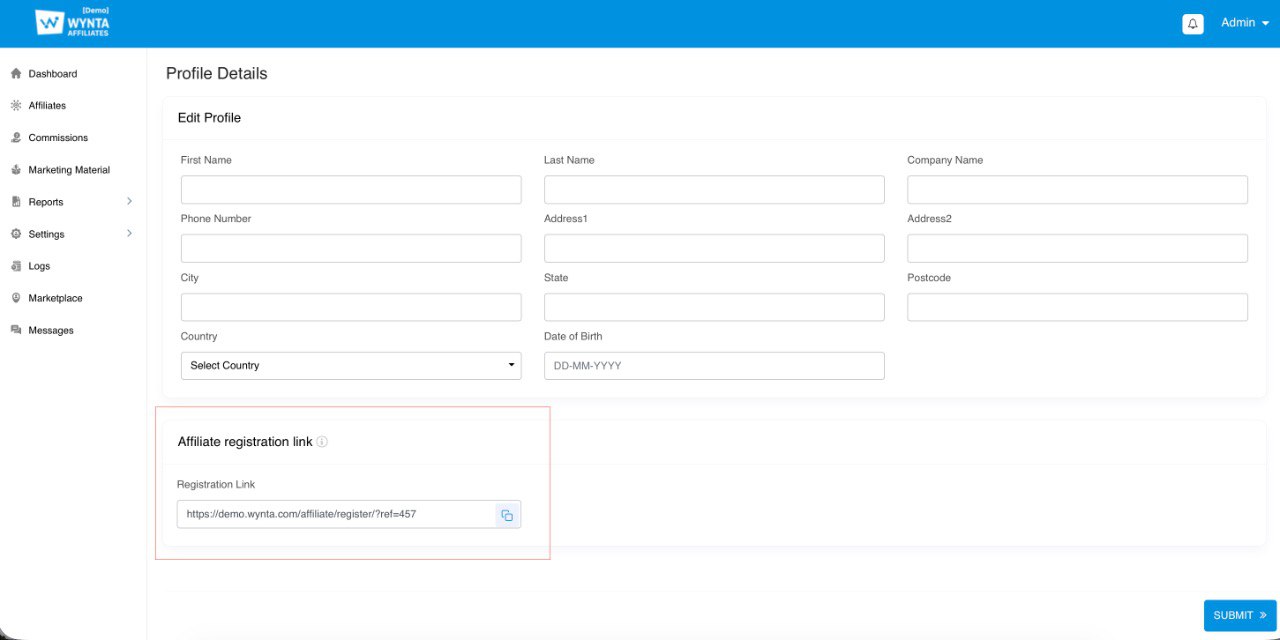
Every Admin User on your Wynta program now gets their own unique, persistent affiliate registration link. When a prospective affiliate signs up using that link, they’re automatically assigned to the Admin User who shared it, no manual intervention required.
Think of it as giving each of your affiliate managers their own branded onboarding pipeline. They share their link, affiliates sign up and the affiliate appears in their Manage Affiliates listing page, ready to be taken care of.
How It Works
The flow is beautifully simple:
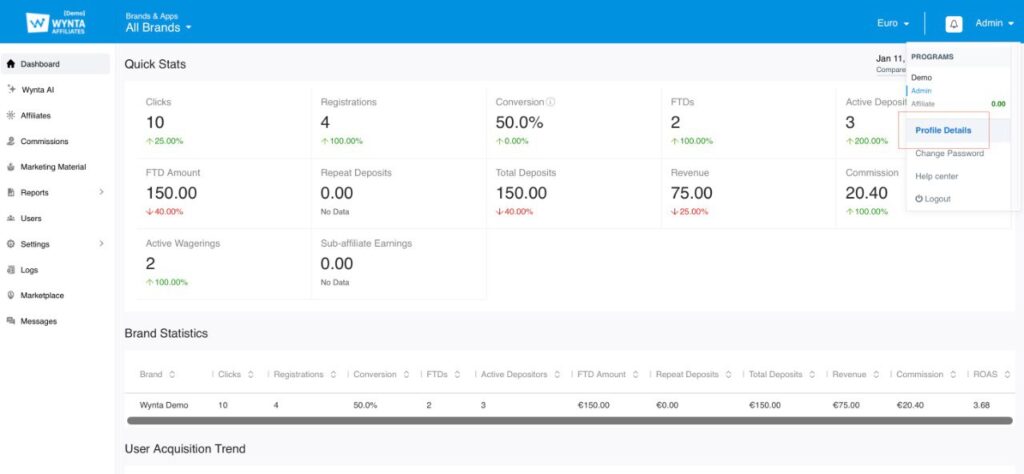
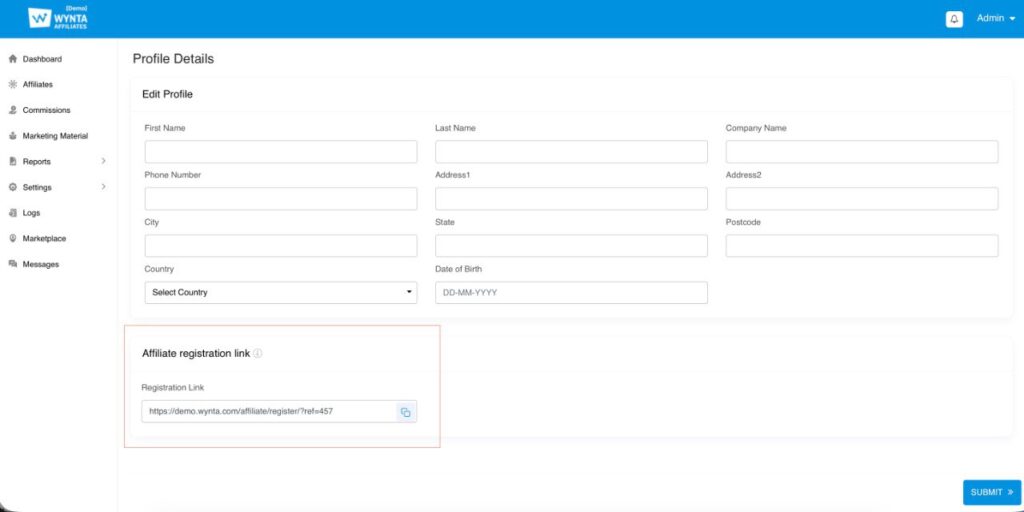
- Admin User gets their link: Each Admin User can find their unique registration link on their profile page in the Wynta admin panel
2. They share it with prospects: Admin Users can distribute their link however they like: email signatures, social media, direct outreach, marketing materials, you name it
3. Affiliates sign up: When a prospect clicks the link, they’re taken to the standard affiliate registration form
4. Automatic assignment: As soon as the affiliate completes registration, they’re automatically assigned to the Admin User whose link they used
5. Instant access: The affiliate appears immediately in the Admin User’s Manage Affiliates section, ready to be set up with commission structures, tracked and managed
No waiting. No manual assignment. No back-and-forth emails in your team asking “whose affiliate is this?”
Why This Matters
For Program Owners
If you’re running the program, this feature means you can finally step back from day-to-day affiliate assigning. Your team can operate independently, onboarding their own affiliates without needing you to route every single sign-up. It’s one less operational task on your plate.
For Admin Users (Affiliate Managers)
For your team members managing affiliates, this is a game-changer. They can now:
- Recruit independently: Share their link directly with prospects and start building their portfolio without waiting for approvals or assignments
- Control their pipeline: Own the entire relationship from first contact through to active affiliate management
- Move faster: No more delays waiting for affiliates to be assigned to them after sign-up
For Affiliates
From the affiliate’s perspective, nothing changes… They still get the same smooth sign-up experience. But behind the scenes, they’re being routed to the designated person from day one, which means faster onboarding and a more personalized experience.
What Stays the Same
This feature works alongside your existing affiliate creation workflows. Admin Users can still create affiliate accounts directly in the admin panel (which continues to auto-assign those affiliates to them), and the program owners (a.k.a. account managers) can still manually assign affiliates where needed.
The registration link is just another much more scalable way to get affiliates into the system.
Getting Started
If you’re an Admin User, head to your profile page, grab your link and start sharing it with your network. Every affiliate who signs up through that link is automatically yours to manage.
Built for Scale
Whether you have two Admin Users or twenty, this feature is designed to help your program scale without adding operational overhead. The more people you have recruiting affiliates, the more valuable this becomes because no one has to play traffic controller anymore.
Have questions about how Unique Affiliate Registration Links work with your specific setup? Reach out to our support team — we’re here to help you make the most of this feature.
Happy recruiting!