What is a Postback?
A postback, sometimes called a server-to-server (S2S) callback, is a real-time notification that Wynta sends to your tracking system the moment a conversion event occurs. Unlike browser-based tracking methods such as cookies or pixels, a postback does not rely on the player’s browser to fire. The communication happens directly between Wynta’s servers and your tracking server, making it significantly more reliable, accurate and resistant to ad blockers and browser restrictions.
When a conversion is recorded in Wynta, for example, a player completing a Registration or making their First Deposit, Wynta constructs your postback URL with real data from that conversion and makes an HTTP request to it. Your tracking platform receives that request, reads the parameters and records the conversion against the originating click.
In plain terms: a postback is Wynta telling your tracker “this player converted”, automatically, instantly and without any involvement from the player’s browser.
What is a Global Postback?
A global postback is a postback configuration that applies to all of your campaigns at once, rather than being tied to a single campaign. When you set up a postback via the main Postbacks page, that configuration will fire for every qualifying conversion across your entire affiliate account, regardless of which campaign drove it.
This is the most common setup for affiliates who use a single tracking platform across all campaigns. You configure your postback URL once, map your variables once and Wynta handles the rest automatically for every goal, every campaign, every conversion.
Note: if you need a postback to fire for a specific campaign only, you can set this at the campaign level. Go to your Campaigns > Admin listing page and click the Postback icon on the relevant campaign row. Any postback configured there will only fire for conversions tracked to that campaign and will not affect your global postback setup.
Ideal Use Cases
Postbacks are essential for any affiliate using third-party tracking software to manage, optimise or report on their campaigns. Common scenarios include:
- Tracker optimisation: Feed conversion data back into Keitaro, Binom, Voluum, BeMob or any other tracker to enable automated rule-based optimisation, such as pausing underperforming sources and scaling winners.
- Accurate tracking: Match every FTD, Registration or Deposit back to its originating click ID so you know exactly which traffic source, sub-ID or creative drove the conversion.
- Paid traffic campaigns: Running paid traffic on Google, Meta, TikTok or native networks? Postbacks let your tracker receive conversion events and pass them upstream to ad platform algorithms.
- Multi-goal funnel tracking: Set up separate postbacks for Registration, FTD and Deposit to track the full player conversion funnel and calculate metrics such as reg-to-FTD rate.
- Fraud prevention: Server-to-server postbacks are immune to ad blockers and browser restrictions, giving you clean, accurate data free from the gaps that affect pixel-based tracking.
- Revenue reporting: Pass the {amount} macro through to your tracker to see real payout and revenue figures alongside your traffic costs, giving you true ROI in one dashboard.
How It Works
- Player clicks your tracking link : A player clicks your Wynta tracking link. Wynta records a unique click, stores any values you passed in param_1, param_2 or param_3, and redirects the player to the operator’s site.
- Player converts : The player completes a conversion goal, i.e. Registration, First Deposit, Deposit, Qualified Player. Wynta records the conversion against the originating click and prepares the postback.
- Wynta fires your postback URL : Wynta replaces all macros in your postback URL with real values from that conversion. For example, {param_1} becomes the click ID your tracker originally passed in, and {amount} becomes the conversion value. Wynta then makes an HTTP GET request to the completed URL. Your tracker receives it, reads the parameters and records the conversion.
- Verify with a test Before going live : Use Wynta’s built-in Test Your Postback tool to fire a simulated conversion with static test values. Wynta will show you the full substituted URL and the HTTP response from your tracking server, confirming the setup is correct end-to-end.
Field Guide
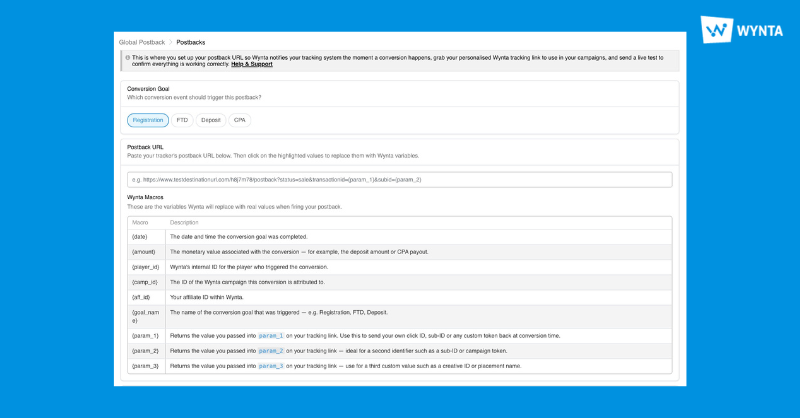
Conversion Goal
The event that will trigger this postback.
Select one: Registration, First Time Deposit (FTD), Deposit, CPA. You need a separate postback entry for each goal you want to track. Each postback fires independently when its specific goal is triggered.

If your tracker accepts all conversion types at a single URL, include {goal_name} as a parameter in your postback URL so your tracker can distinguish between conversion types and apply the correct payout or funnel logic.
Postback URL
The full URL of your tracking platform’s postback endpoint.
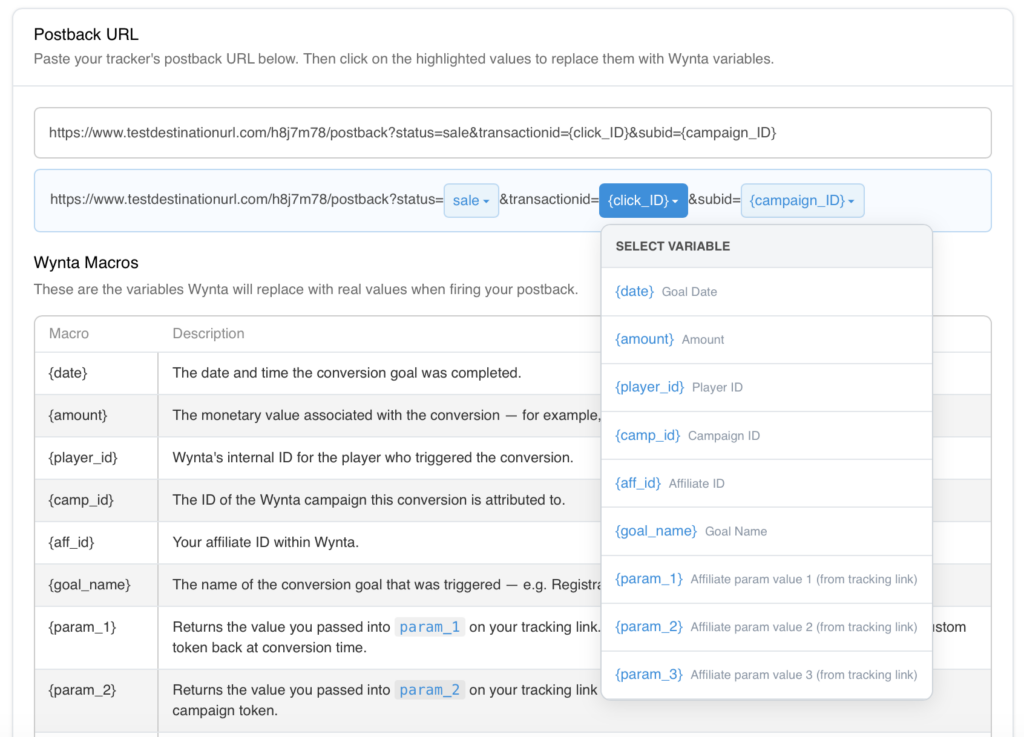
Paste the complete URL exactly as provided by your tracker. After pasting, each parameter value is highlighted. Click any value to replace it with a Wynta macro from the dropdown.
- param_1: Enter the dynamic token your tracker uses for its click ID. For example {clickid} for Keitaro or Binom, or ##clickid## for Voluum. This value will be appended to your tracking link at param_1= so that Wynta stores it and returns it at conversion time.
- param_2 (Optional): A second custom value, typically a sub-ID, source token or campaign identifier from your tracker. Appended to your tracking link at param_2=.
- param_3 (Optional): A third custom value, typically a creative ID, placement name or additional segmentation token. Appended to your tracking link at param_3=.
Wynta Macros
Macros are dynamic placeholders you embed inside your postback URL. When Wynta fires the postback, every macro is replaced with the real value for that specific conversion.
- {date} – The date and time the conversion goal was completed, in UTC.
- {amount} – The monetary value associated with the conversion, for example the deposit amount or CPA payout. Use this to report revenue alongside your traffic costs
- {player_id} – Wynta’s internal identifier for the player who triggered the conversion. Useful for deduplication or player-level reporting.
- {camp_id} – The ID of the Wynta campaign this conversion is tracked to. Useful when running multiple campaigns under the same account.
- {aff_id} – Your affiliate ID within Wynta.
- {goal_name} – The name of the conversion goal that was triggered, for example Registration, FTD or Deposit. Useful if you send all goals to a single postback endpoint and need to distinguish between them on your tracker’s side.
- {param_1} – Returns the value your tracker passed into param_1 on the tracking link when the player clicked. Typically used for your tracker’s click ID — the key identifier that closes the attribution loop.
- {param_2} – Returns the value passed into param_2 on the tracking link. Typically used for a sub-ID, campaign token or traffic source identifier.
- {param_3} – Returns the value passed into param_3 on the tracking link. Typically used for a creative ID, placement name or ad set identifier.
How param_1, param_2 and param_3 work:
These macros are only populated if you passed values into the corresponding parameters on your tracking link. For example, if your tracking link includes param_1={clickid}, Wynta stores your tracker’s click ID against that click. When the conversion fires, Wynta places that stored value into {param_1} in your postback URL, completing the tracking loop.
Your tracker’s click ID is the single most important value in the postback flow. Without it, your tracker cannot match the conversion to the original click. Always populate param_1 with your tracker’s click ID token and map {param_1} to the corresponding parameter in your postback URL.
Tracking Link
Here you’ll find the completed, ready-to-use tracking link generated by Wynta. The param_1, param_2 and param_3 will be correctly formatted and appended as shown below based on your param entries (input these in the appropriate fields).
By default we will show your default/ basic tracking link, but if you need to use a tracking link from a specific campaign, have that handy to copy and paste it into the box (Your Tracking Link) as below.
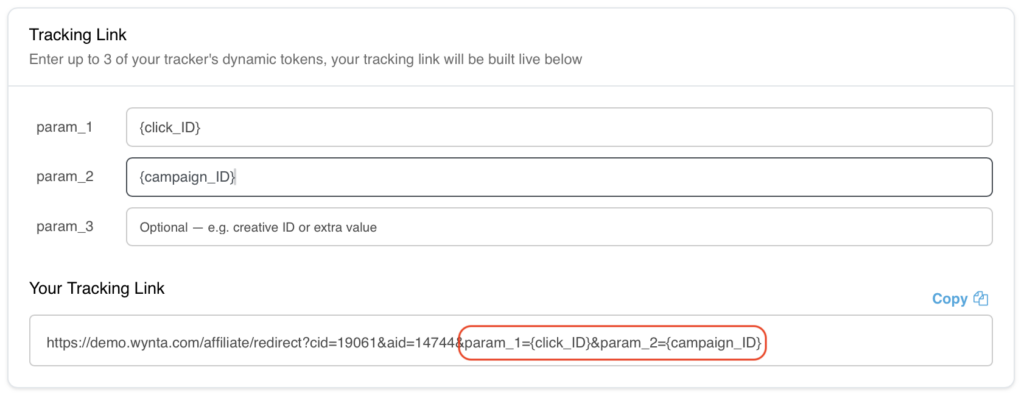
Once done, use the Copy button and paste the final tracking link directly for your campaign. This is the link your players will click.
Test Your Postback
Click the Test Your Postback button to expand the test panel. Enter static test values for each macro in your URL, then fire the postback.
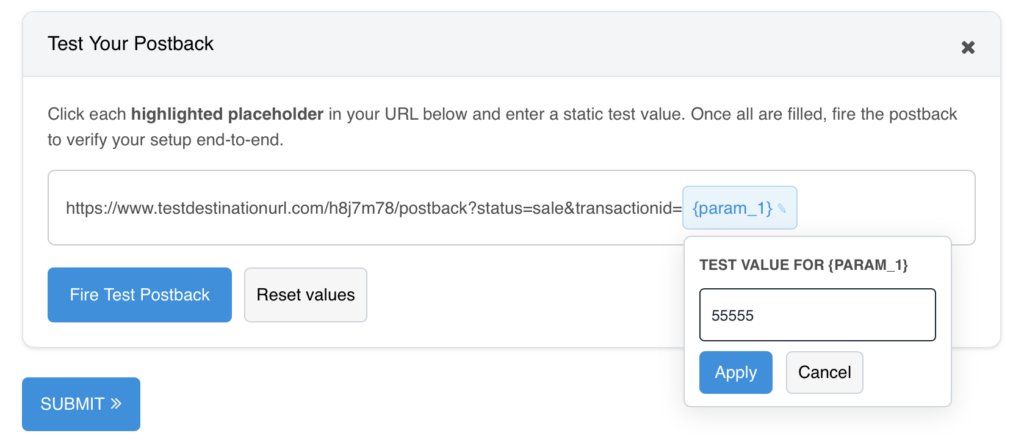
Enter realistic test values, fire the postback and confirm your tracker returns HTTP 200. A non-200 response means the URL, endpoint or parameters need attention before real conversions start flowing.
Your tracking server must be able to receive inbound HTTP requests from Wynta’s servers. Ensure your postback endpoint is publicly accessible and that no firewall rules are blocking external inbound requests.